Remote SSH through a relay
SSH-LINK downloads and setup docs
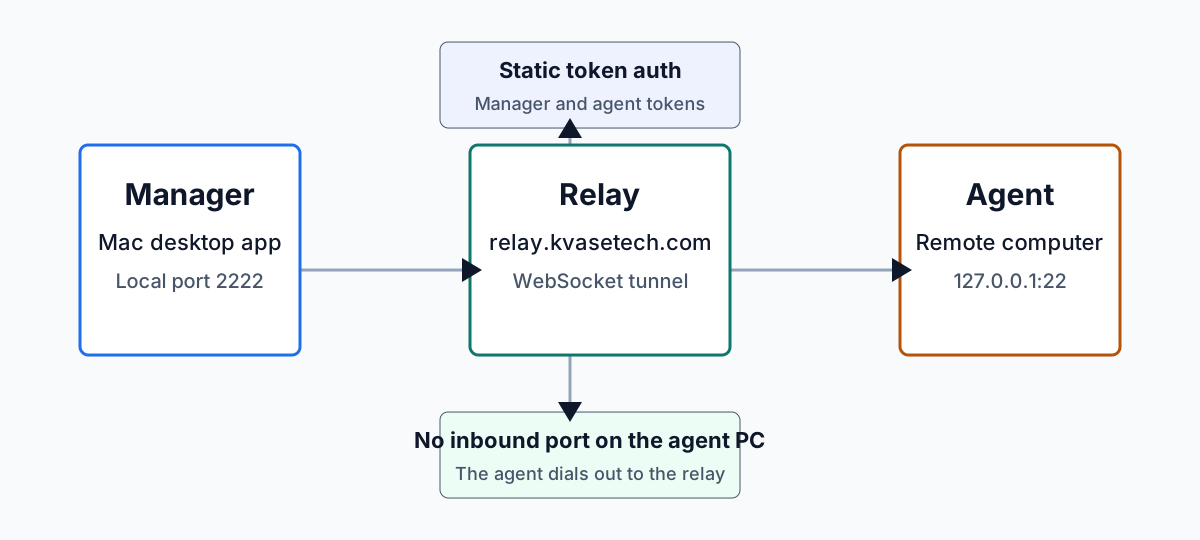
Install the Manager on your Mac, run the Agent on the remote computer, and connect to local SSH without opening inbound ports on the agent PC.
Latest binaries
Download Manager and Agent
These links point at the rolling latest GitHub Release produced by GitHub Actions. Use ARM64 for Apple Silicon and most Windows-on-ARM machines; use AMD64 for standard Intel or AMD PCs.
SSH-LINK Manager
Desktop app for listing online agents, opening local tunnels, and watching session status.
Download macOS universalAgent
User-managed agent for a Windows PC. Start it manually when you want the PC reachable.
Agent
Agent binary and sample config for Linux workstations, servers, and small devices.
Agent
Run this on a Mac you want to expose through the relay. The Manager and Agent can be on different Macs.
Quick start
Recommended first setup
Install OpenSSH on the remote machine first, then run the Agent manually. The Manager opens a local port on your Mac and bridges it through the relay.
Prepare SSH
Enable the local SSH server and confirm it listens on port 22.
Run the Agent
Use a YAML file beside the executable, command-line parameters, or the interactive prompt.
Connect from Manager
Choose an online service, start a local listener, then SSH to the local port.